

Description
In this lab, you will implement several collectives discussed in the lessons and analyze their performance. This gives you an opportunity to solidify your understanding of the relevant algorithms and to see how latency and bandwidth considerations impact overall performance. You will also be familiarizing yourself with the MPI (Message Passing Interface) standard, which you will use in subsequent assignments. MPI provides a portable interface for parallel tasks running on different nodes of a cluster or supercomputer to send messages to each other.
## Programming
Your first task is to implement the following collectives
* Reduce
* Scatter
* Gather
* Allgather
* Broadcast : Tree-Based Implementation
* Broadcast : Scatter-Allgather Implementation
## Getting Started
Begin by obtaining the starter code from the github repository.
“`
git clone –recursive https://github.gatech.edu/omscse6220/lab3.git
“`
Note that this is the [GT github server](https://github.gatech.edu), so you will need to authenticate with your GT credentials.
Optionally, you may choose use a git hosting service for your code. As always, please **do not make your repository public** on Github or another git hosting service. Anyone will be able to see it. If you feel the need to use a hosting service for your project, please keep your repository private. Your GT account allows you to create free private repositories on [the GT github server](https://github.gatech.edu).
In the given files, you are to implement an interface with function of the form GT\_\<collective\>, which
mirrors the MPI library. Thus, GT_Bcast should do the same thing as MPI_Bcast. In your implementation,
**you may only use point-to-point MPI operations.** These are  `MPI_Send`, `MPI_Recv`, `MPI_Isend`, `MPI_Irecv`, `MPI_Wait`, `MPI_Sendrecv` and `MPI_Waitall`. Simply calling `MPI_Bcast` within your `GT_Bcast` implementation, for instance, is not allowed.
Several good sources of documentation for MPI are available online. There are several different versions and implementations; however, these differences will not be significant for our purposes.
* [OpenMPI](http://www.open-mpi.org/doc/)
* [MPI Forum](http://www.mpi-forum.org/docs/)
* [LLNL](https://computing.llnl.gov/tutorials/mpi/)
* [MPI Tutorial](http://mpitutorial.com/)
* [Slides from Robert van de Geijn](https://github.gatech.edu/omscse6220/lab3/blob/master/collective_communication.pdf)
MPI is a very general tool, and to fully implement all of its features is beyond the scope of this lab. Therefore, you are permitted to make simplifying assumptions such as:
* the input buffers are valid memory addresses, not MPI_IN_PLACE for example.
* the root is zero
* the datatype is MPI_INT
In most cases, these assumptions are documented through the `assert` statements in the starter code.
## Testing Your Code and Measuring Performance
In addition to the starter code for the MPI-like functions that you are to implement, the repository contains:
* a main file driver.c
* a Makefile
* test files of the form \< collective\>\_test.c and \< collective\>\_test.h, which run some simple tests (apologies for the awkward C-style Objected-oriented and polymorphic code here)
* examble.pbs, an example script for submitting jobs to PACE.
An example how to test your code locally would be:
“`
make clean
make COLLECTIVE=scatter IMPL=tree
mpirun -np 3 ./driver
“`
For this project, *driver* acts as both the performance and accuracy check.
# Analysis
## Parameter Fitting
In our basic model of distributed memory, we say that the time for some communication is given by `T = A + B*n`, where the constant term A (alpha) represents the **latency** and the linear coefficient B (beta) represents the **inverse bandwidth** (see the lesson for details). Given some data on communication times, your task is to fit A and B parameters.
The file serial.tsv contains some measurements on the time taken to perform some point-to-point communications on the Penguin-on-Demand cluster. Your task is to find values for the parameters A and B, so that the results curve passes close to the data on a logscale plot like the one shown below.
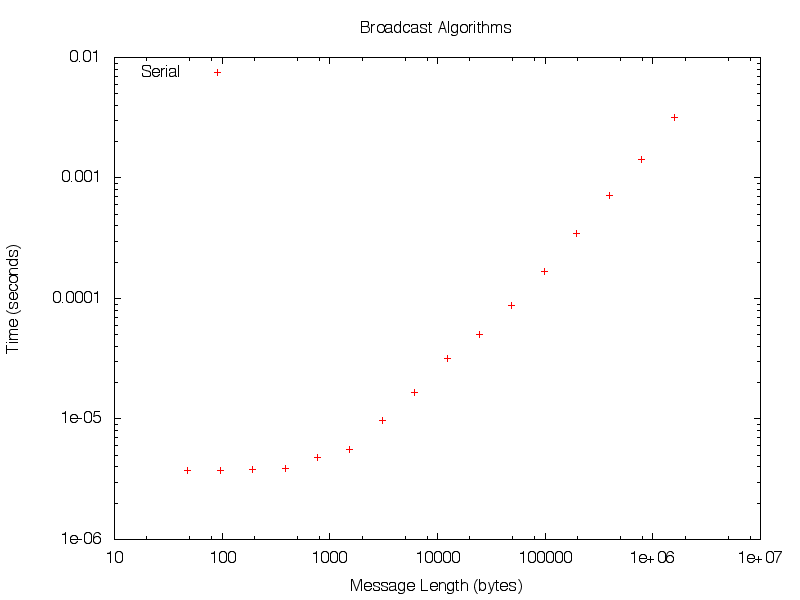
If you have access to gnuplot, you may modify the alpha and beta parameters at the file fit.gn to help you visualize the accuracy of your fit. Note that a least-squares solution is not appropriate here.
Once you have a good fit, edit the file ‘short_answers.md’ and save your A and B values.
## Identify the Algorithm
The files bcast-alg1.tsv and bcast-alg2.tsv show timing results from two separate implementations of GT_Bcast. One uses a tree-based algorithm, the other the scatter/allgather approach. From the plot below, can you tell which is which?
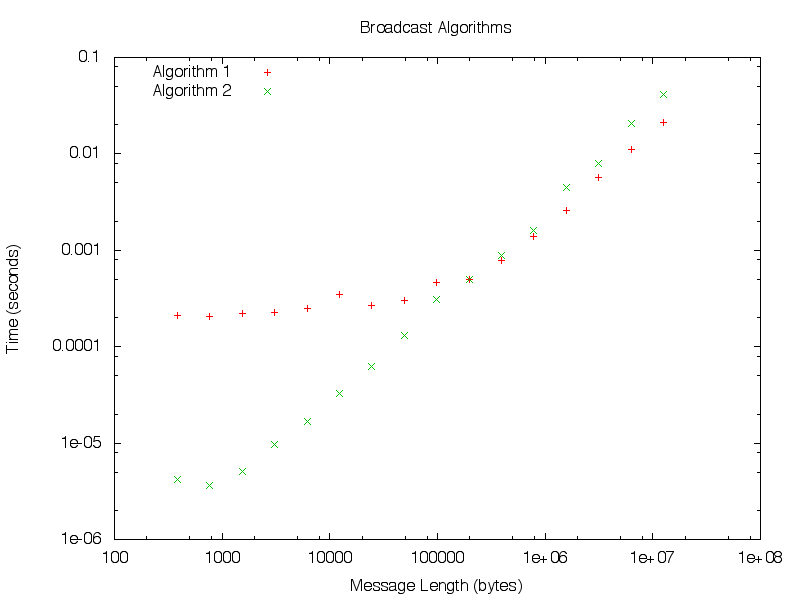
Write up your explanation in the file ‘short_answers.md’ and we will review it manually.
## Deliverables
The deliverables for this lab are as follows:
* reduce_tree.c
* scatter_tree.c
* gather_tree.c
* allgather_bucket.c
* broadcast_tree.c
* broadcast_sag.c
* short_answers.md
Please do not make any changes to the *Makefile*. If you include any additional headers or libraries, please make sure they compile as-is on the VM, PACE and through Bonnie.
## Submitting Your Code
When you have finished and tested your implementations, please submit them by using:
“`
python submit.py
““
which will perform a quick compilation and correctness test. After the deadline, the TAs will pull the code and perform some timing runs to confirm that your implementation is efficient. It is recommended that you used the strategies discussed in the lecture videos–tree-based algorithms and bucketing in particular–though you are encouraged to explore other ideas as well.
## Vagrant
You can use the vagrant file from Lab 0 or Lab 1


